


Microsoft Excel Advanced Functions & Data Modelling Course

Our Excel Advanced Functions and Data Modelling Course is designed for experienced Excel users who want to build more powerful spreadsheets, analyse data more effectively and create more advanced reports. This live, instructor-led Microsoft Excel course covers complex functions, XLOOKUP, INDEX and MATCH, dynamic array functions, text and date functions, What-If Analysis, form controls, advanced Pivot Tables and Power Pivot.
You can join one of our upcoming public online Excel Advanced Functions and Data Modelling course dates or arrange a private session for your team, delivered online via Microsoft Teams or onsite at your office. The course includes live demonstrations, guided practical exercises, time to ask questions, and supporting quick reference guides to help you apply advanced Excel techniques, reporting tools and data modelling skills in the workplace.
Not sure if this is the right Excel course?
Take our free Excel Skills Assessment to answer a few practical questions and receive an instant recommendation based on your current Excel knowledge and experience.
✅ Takes around 3 minutes
✅ Instant recommendation
✅ No registration required
Take the Excel Skills Assessment
Need a quick explanation of an Excel term? Browse our free Excel Glossary.

Course Schedule
1 day
.svg)
9:30am - 4:30pm (UK Time)
.svg)
Online Live
£150 + VAT
1 day
9:30am - 4:30pm (UK Time)
Online Live
£150 + VAT
Course Code: EXCEL4
Duration: 1 day
Aims
This course is aimed at attendees who want to expand their knowledge into more complex functions, build reports using form controls, working with Power Pivots and use built-in automation offered by Microsoft Excel.
Prerequisites
Attendees who wish to attend this Microsoft Excel course should have attended our Excel Advanced course or be competent with the following advanced functions: IF, VLOOKUP, HLOOKUP, SUMIF and COUNTIF and have created and edited PivotTables.
Objectives
On completion of this course, delegates will be able to:
- Use Statistical, Lookup, Date, Math & Trig and Text functions.
- Build forms using Form Controls
- Carry out "What-If Analysis" using Scenario Manager and Goal Seek
- Load data from a CSV/Text file.
- Use advanced features of Pivot Tables (e.g. Formulas, Conditional Formatting)
- Use Power Pivots to build Pivot Tables
Course Content
Introduction and Objectives
Using Statistical, Lookup, Text, Math & Trig, and Date Functions
- Using COUNTIFS, SUMIFS, AVERAGEIFS, MAXIFS, MINIFS, LARGE, SMALL and IFS
- Use XLOOKUP, INDEX, MATCH, SORT, TAKE and UNIQUE
- TEXT, TEXTSPLIT TEXTJOIN
- SIGN
- Calculate dates using NETWORKDAYS, EMONTH, EDATE, WEEKDAY and WORKDAY
Form Controls
- How to insert form controls like a Combo box, checkbox, spin button and list box to build reports
- How to use form controls with Formulas
- How to link a checkbox to conditional formatting
What If Analysis Tools
- Obtaining the desired result to a formula using Goal Seek, Data Table and Scenario Manager
- Creating a scenario summary and Pivot Table report
Get and Transform Data
- Load and Transform Data
- Import Text/CSV file
Advanced features of Pivot Tables
- Apply Conditional Formatting to a Pivot table
- Creating Formulas in a Pivot Table
- Show report filter pages
- Adding Slicers and Timeline across multiple Tables
Power Pivots
- What is Power Pivot?
- How to add Power Pivot to the ribbon tabs
- How to add Excel data to the data model
- Build a relationship between tables
- Create a Pivot Table using the related tables
Hints and Tips
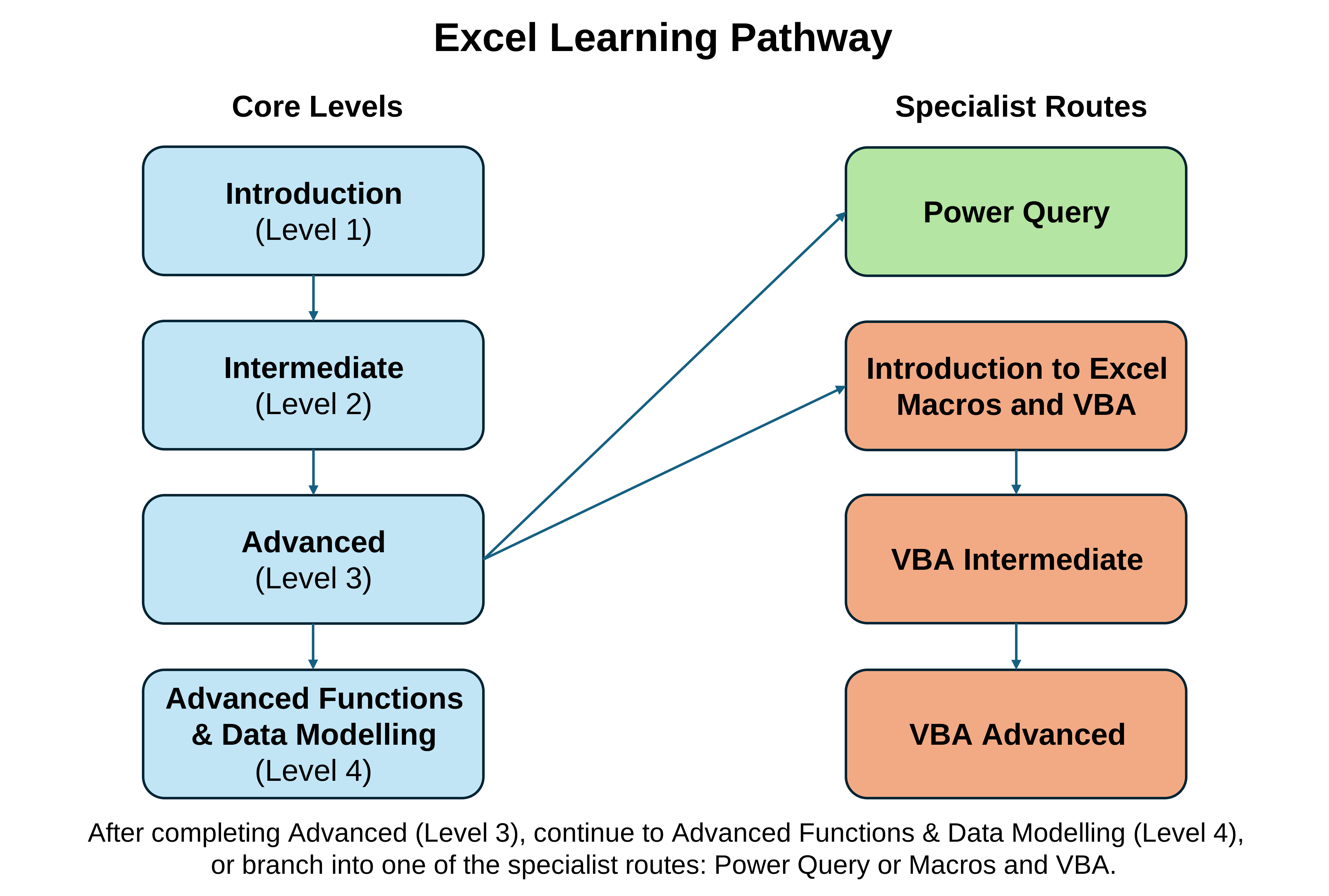
Not sure where to begin? Our free Excel Skills Assessment will recommend the most suitable starting point in our Excel Learning Pathway.
✅ Takes around 3 minutes
✅ Instant recommendation
✅ No registration required
Take the Excel Skills Assessment
Next Steps
Frequently Asked Questions (FAQs)
Who should attend the Excel Advanced Formulas & Data Modelling course?
Users who are confident with Excel at Advanced level and want to master complex functions, form controls, What-If analysis, advanced Pivot Tables, and data modelling with Power Pivot.
What are the prerequisites?
You should be comfortable with advanced functions (e.g., IF, VLOOKUP/HLOOKUP, SUMIF/COUNTIF), absolute references, multi-sheet formulas, and creating/editing Pivot Tables.
How is the course delivered?
Live online via Microsoft Teams with an expert instructor, demonstrations and guided practical exercises.
Which Excel version do I need?
Any current desktop version of Microsoft Excel (Microsoft 365 or Excel 2016+) is suitable. A Windows PC is recommended for the best experience.
Will I receive a certificate?
Yes — you’ll receive an ExperTrain certificate of completion after the course.
Does the price include VAT?
No. The price (£150) excludes VAT at 20%. VAT is added at checkout for UK customers where applicable.
How do I book a place?
Use the booking/enquiry options on this page, choose your preferred date and we’ll confirm availability and send joining instructions.
More Excel training: Compare all levels and specialist topics in our Excel training hub.
Course at a Glance
1 day
9:30am - 4:30pm (UK Time)
Online Live
£150 + VAT
1 day
9:30am - 4:30pm (UK Time)
Online Live
£150 + VAT
You may also like...


Learn to use Microsoft Planner to create plans, organise and assign tasks, track progress and collaborate effectively with colleagues.

Learn Excel Power Query to import, clean, transform, merge and reshape data, then load repeatable queries for reporting and analysis.
Master advanced Excel functions, XLOOKUP, dynamic arrays, What-If Analysis, PivotTables and Power Pivot for more powerful reporting and data modelling.


.png)
